Best Tools for Product Launch Videos: 6 Options Compared
 By the Maybe Labs team
For a software launch video built from a brief and product captures, shortlist Maybe Labs or Clueso. Choose Jitter to animate existing designs, Canva for a template-led edit, Screen Studio for a recorded Mac product demo, and After Effects for custom motion and compositing. Maybe Labs has gradual private-beta access. Match the tool to your assets, review process, and delivery requirements.
Disclosure and method: Maybe Labs publishes this comparison and is included in it. This guide was prepared with AI-assisted research using official product documentation reviewed on October 29, 2026. Recommendations are editorial judgments about workflow fit. We have not conducted hands-on competitor tests or measured comparative output quality or production speed. The fictional brief and locally assembled proof clip are planning resources, not customer results.
Which product launch video tool should you choose?
| Tool | Recommended workflow | Documented starting material | What to verify for your launch |
|---|---|---|---|
| Maybe Labs | A brief-led motion-graphics launch story | Product brief, approved brand assets, and verified UI captures | Private-beta access and the story, visual, and animatic review stages. |
| Clueso | AI-assisted production from mixed source material | A prompt, recording, document, slides, or screenshots | Which input path and revision controls suit the launch in your selected plan. |
| Jitter | Animating an existing visual design | Design layers, Figma assets, images, and other media | Who owns the motion direction, design revisions, and required export formats. |
| Canva | Assembling a launch video around a template | Templates plus your own text, images, and clips | Template flexibility, product readability, and any paid assets or export requirements. |
| Screen Studio | A launch centered on an actual software workflow | A screen recording made on a Mac | Mac compatibility and whether the captured interaction explains the launch claim. |
| Adobe After Effects | Custom motion graphics and compositing | A storyboard, design assets, and any footage | A motion-design owner, editable project handoff, and revision scope. |
These tools address different production jobs, and a launch can combine them. A recorded proof sequence can sit inside a designed introduction; an editor or motion designer can assemble the final campaign cut. Choose the necessary evidence and level of control before comparing subscriptions. A launch for new viewers also needs to introduce the product, while a feature update can assume more existing context.
Maybe Labs: a reviewed launch story from a brief
Choose Maybe Labs when you want a short motion-graphics introduction to a software product: a clear claim, branded typography, real product evidence, and a next step. Bring the launch brief, brand kit, and captures supporting the claim. Review the brief and story, required visuals, and timed animatic before rendering. The product launch video workflow describes those handoffs.
Maybe Labs is free during private beta, with no credit card required and access granted gradually through the waitlist. Paid pricing has not been announced; check pricing and access. Plan around that access requirement. Choose a continuous product recording when the claim depends on an uninterrupted interaction, and a designer-led workflow when you need detailed control over the animation.
Clueso: a launch assembled from multiple input types
Clueso’s official site describes prompt-led creation and inputs including recordings, documents, slides, and screenshots. Its stated scope includes marketing launches as well as demos and training. Shortlist it when your launch material spans several formats. Evaluate the selected input path with your actual brief, then check how revisions preserve product labels, narration, and the intended availability claim.
Jitter: motion built around your existing designs
Jitter’s product documentation describes importing Figma designs as editable layers, animating media, and exporting video. Shortlist it when your team already has a visual direction and wants to shape the motion around those assets. Ask the person responsible for the animation to test a UI revision and a second aspect ratio. This is a recommendation for its design workflow, not a claim that its capabilities are limited to manual animation.
Canva: a template-led launch edit
Canva’s product video maker supports customizable templates, uploaded media, trimming, and animation. Shortlist it when a template provides a useful starting structure and your team wants to assemble the launch with its own assets. Check that the template gives the product enough screen space, that the story fits the audience, and that the required assets and exports are available on your plan.
Screen Studio: a launch with a recorded product demonstration
Screen Studio’s product-demo page documents a Mac recording workflow with zoom, cursor treatment, editing, and export controls. Shortlist it when showing the actual task is central to the launch. Prepare representative demo data and keep essential labels readable. Write the hook and closing availability line as part of the brief, then check that the recording supports the advertised capability.
After Effects: custom motion with a design owner
Adobe describes After Effects as motion-design and visual-effects software for animating text, graphics, and illustrations and compositing footage. Shortlist it when the launch needs a specific animation treatment and someone can own production. Agree on the storyboard, review rounds, source project, fonts, asset rights, and future revisions. A freelancer or studio can use this workflow; get a scoped proposal rather than assuming a universal price or turnaround.
A reusable brief for comparing launch video tools
Use this fictional launch brief with each shortlisted tool: “Introduce Example Board, a launch-planning app for small software teams, in a 40-second video for new viewers. Show a project lead saving and reopening a personal view of in-progress work assigned to Maya. Keep task IDs EB-104 and EB-112 consistent. End with an invitation to join the Example Board beta waitlist. Do not imply shared views, general availability, customer adoption, or measured time savings.”
The app, audience, beta condition, and launch are illustrative. Supply the same approved brand assets, source facts, and product captures to every candidate. Request a 16:9 version for a launch page and a separate 9:16 social edit, then inspect both. Use the product video brief to record the audience, claim, evidence, owner, destination, and approval requirements.
Worked storyboard: a 40-second software launch
| Time | Launch beat and suggested copy | Evidence or review requirement |
|---|---|---|
| 0–4s | Hook: “Your launch work. One view away.” | Establish the starting work list without inventing a productivity metric. |
| 4–8s | Reveal: “Meet Example Board.” | Show the product name and actual sample interface. |
| 8–32s | Proof: “Filter. Save. Reopen.” | Use the 24-second proof excerpt below; request an extra capture if an exact click sequence must be shown. |
| 32–36s | Outcome: “Return to the work that matters.” | Hold the reopened personal view with the same filters and task IDs. |
| 36–40s | Next step: “Join the beta waitlist.” | The destination and availability line must match the fictional brief. Replace them with verified facts for a real launch. |
Read descriptive transcript: Example Board: saved-view proof excerpt for a launch storyboard
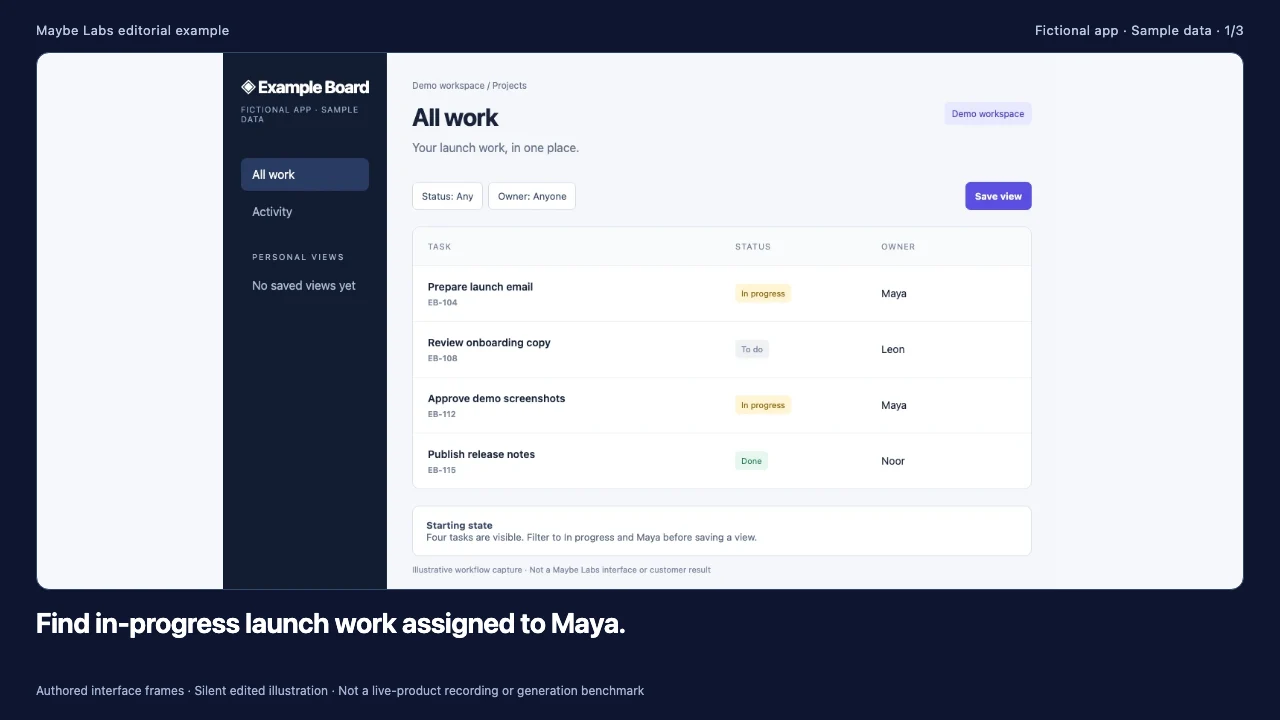
- 00–08s A project lead begins in All work. Identify the two relevant tasks, EB-104 and EB-112, among four sample records.
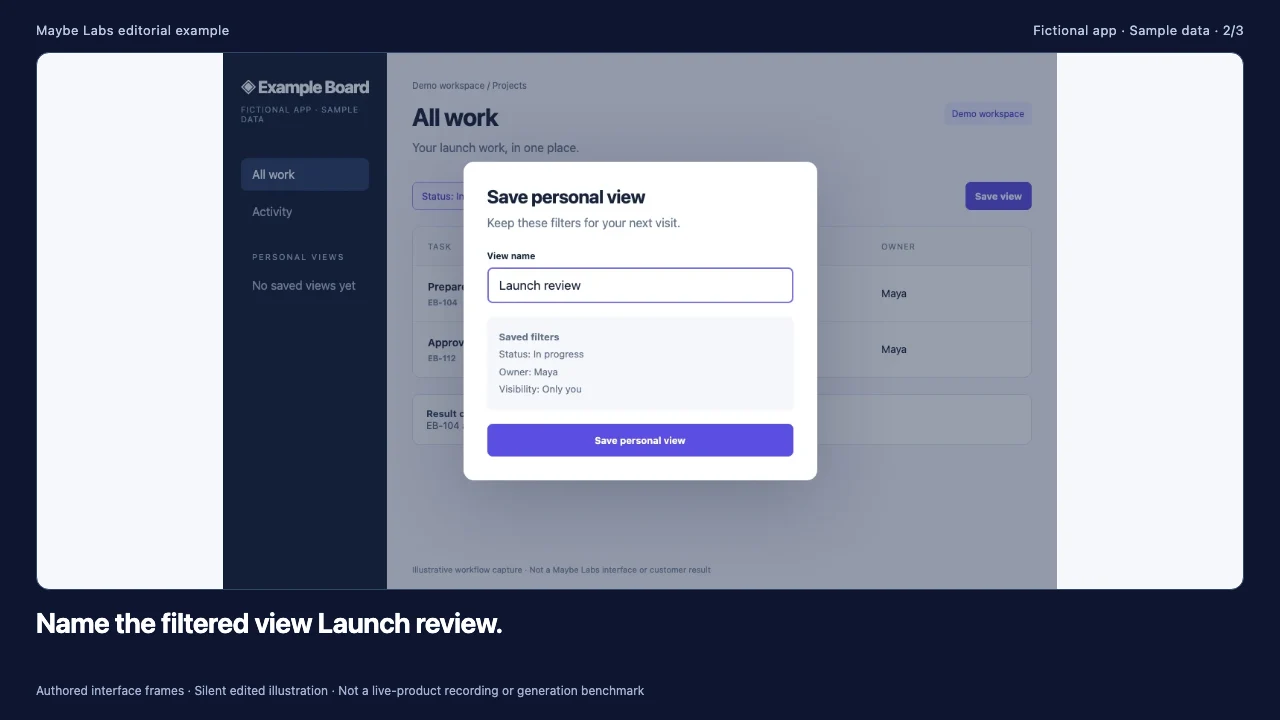
- 08–16s Save Status In progress and Owner Maya together. The dialog identifies this as a personal view visible only to its creator.
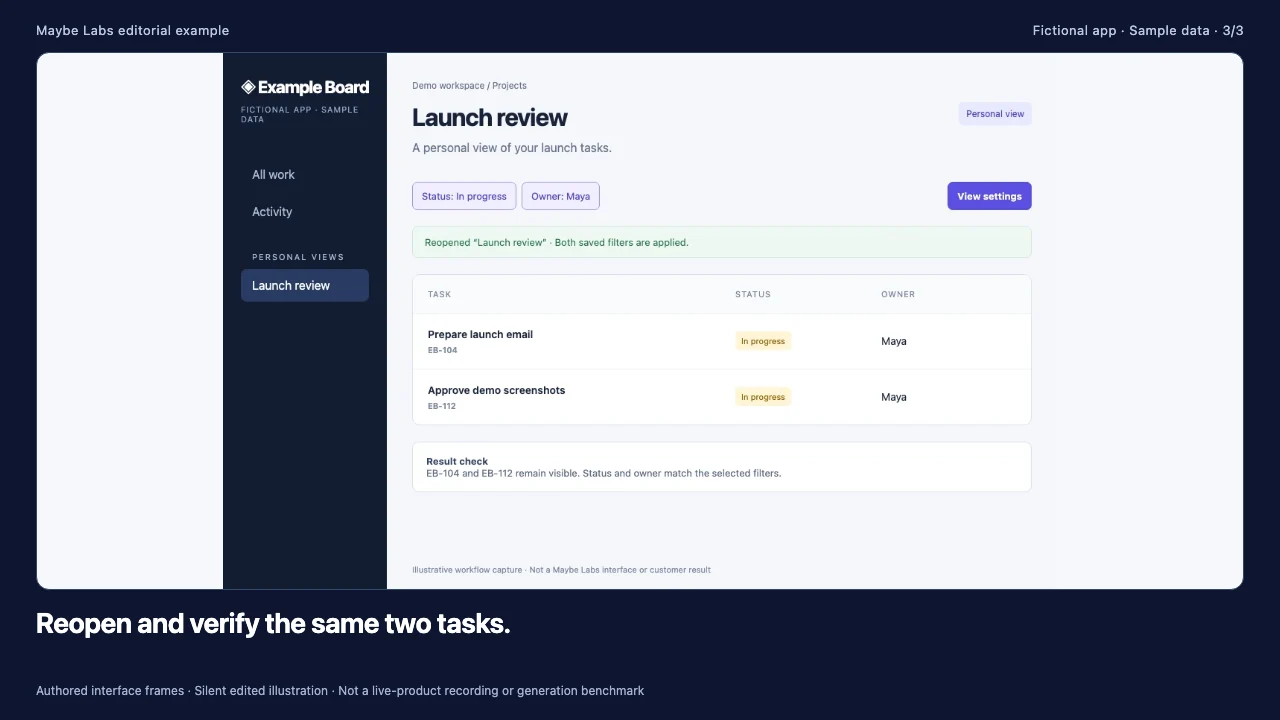
- 16–24s Select Launch review under Personal views. Confirm the task IDs and filter labels agree with the starting state.
Inspect the source frames: starting list, save dialog, and reopened view. The excerpt illustrates state continuity, not processing speed or unrecorded clicks. The demo example gallery explains its source facts, and the SaaS storyboard template helps adapt the wider launch story.
Evaluate the same revision and deliverables in every tool
| Check | Exercise | What a useful result looks like |
|---|---|---|
| Product accuracy | Compare the rendered proof with the supplied frames. | The same filters, record IDs, and personal-only scope remain clear. |
| Story revision | Change the CTA from beta waitlist to an approved demo request. | The closing copy, captions, narration if used, and destination all agree. |
| UI revision | Rename Launch review to Sprint review. | The revised name agrees across affected shots and supporting copy. |
| Format adaptation | Review the 16:9 and 9:16 cuts at their actual viewing sizes. | The product remains legible and essential information survives the reframing. |
| Handoff and cost | Record plan, authoring effort, render wait, review time, charges, and retained project assets. | A teammate can revise the launch later and explain the cost basis. |
Record observed results during an authorized trial or project. We have not filled this worksheet with unobserved vendor timings or quality scores. Before buying, verify current seats, usage limits, export options, asset licensing, and subscription terms directly with the vendor. For an agency proposal, also define the deliverables and revision rounds. The product video cost guide provides a scope worksheet.
Report a benchmark so someone else can repeat it
For every run, record the tool and version or access date, plan, operator experience, source-pack version, settings, start and finish times, failure count, manual edits, revision request, and final output links. Report active work separately from elapsed turnaround. Separate existing subscription cost from incremental usage charges. Include unsuccessful attempts and any excluded runs with a reason.
A single run illustrates one outcome; it does not establish typical performance. Before publishing comparative averages, repeat the declared task and show the sample size, spread, and unresolved failures. Results are not published here because those runs have not been completed. The existing editorial clip is an example of the brief, not an entry in a tool benchmark.
For a complete release-update handoff, inspect the brief-to-video worked example. Check Maybe Labs capabilities and limitations for current approvals, revision behavior, and delivery conditions.
Product launch video tool FAQ
What is the best tool for product launch videos?
Shortlist Maybe Labs or Clueso for a brief-led software launch, Jitter for animating designs, Canva for a template-led edit, Screen Studio for a Mac product recording, and After Effects for custom motion. Choose based on your evidence, desired control, and delivery requirements. Maybe Labs requires private-beta access.
Can I use Canva for a product launch video?
Yes. Canva documents customizable product-video templates, uploaded media, editing, and animation. Evaluate whether your chosen layout explains the product clearly and supports the required assets and export. It is a valid option when that workflow fits the launch.
Do I need After Effects to make a launch video?
No. After Effects is an option for custom motion and compositing with a design owner. A brief-led tool, design animation tool, template editor, or screen recorder can be sufficient when it supports the story, evidence, and deliverables you need.
Can I make a launch video from product screenshots?
Yes, when the captures substantiate the claims you plan to make. Keep readable labels and consistent states, and distinguish a designed transition from an actual recorded interaction. Capture additional footage when the claim depends on a specific action or timing.
How long should a product launch video be?
Choose a duration that lets a new viewer understand the product, inspect the evidence, and identify the next step. The worked storyboard here is a 40-second planning example, not a proven performance optimum. Review the actual cut and the publishing platform’s current requirements before setting the final duration.
How much does a product launch video tool cost?
Compare the current plan or license with seats, included usage, asset rights, export requirements, and production and revision effort. A software subscription and an agency quote cover different scopes. Maybe Labs is free during private beta, and paid pricing has not been announced.
Is Maybe Labs available immediately?
Access is granted gradually through the private-beta waitlist. Signing up does not guarantee immediate Studio access. The beta is free with no credit card required; confirm access before planning a launch deadline around it.
Were these launch video tools tested hands-on?
This comparison is based on official product documentation reviewed on October 29, 2026, and Maybe Labs product facts. It is not a hands-on competitor benchmark. The storyboard is a fictional planning example, and its proof excerpt was assembled locally rather than generated in the compared vendor accounts.
Sources and next steps
- Maybe Labs launch workflow and beta pricing: production scope, review, and access.
- Clueso official site: video creation inputs and product-launch use cases.
- Jitter product documentation: design import, animation, and export.
- Canva product video maker: templates, media, and editing.
- Screen Studio product-demo page: Mac recording and editing workflow.
- Adobe After Effects: motion design, animation, and compositing.
Prepare the brief and source evidence, then evaluate the tools you can access. Use the launch video review checklist before approving the final cut. When the job is a recurring release announcement for existing users, the product update video tool comparison addresses that workflow.
Make your next launch in motion
Bring a brief, brand assets, and product captures. Review the story, visuals, and exported video before publishing. Request free private-beta access.
Get early access →