Product Demo Video Examples: One Task, Three Audiences
 By the Maybe Labs team
A strong product demo video gives one audience enough evidence to understand one task. These three original examples address a project lead saving a view, a developer submitting and retrieving a report, and an administrator reviewing an export request. Each has a finished clip, descriptive transcript, source-screen explanation, and a clear boundary around what the sequence proves.
How these were made: we authored fictional interface states and assembled silent, captioned clips locally. They are editorial examples, not recordings of a live customer product or benchmarks of Maybe Labs output. The visible identifiers and datasets are samples. Their edited timing does not measure response time, and a transition between frames does not prove an unrecorded interaction.
Example 1: a project lead saves a recurring workflow
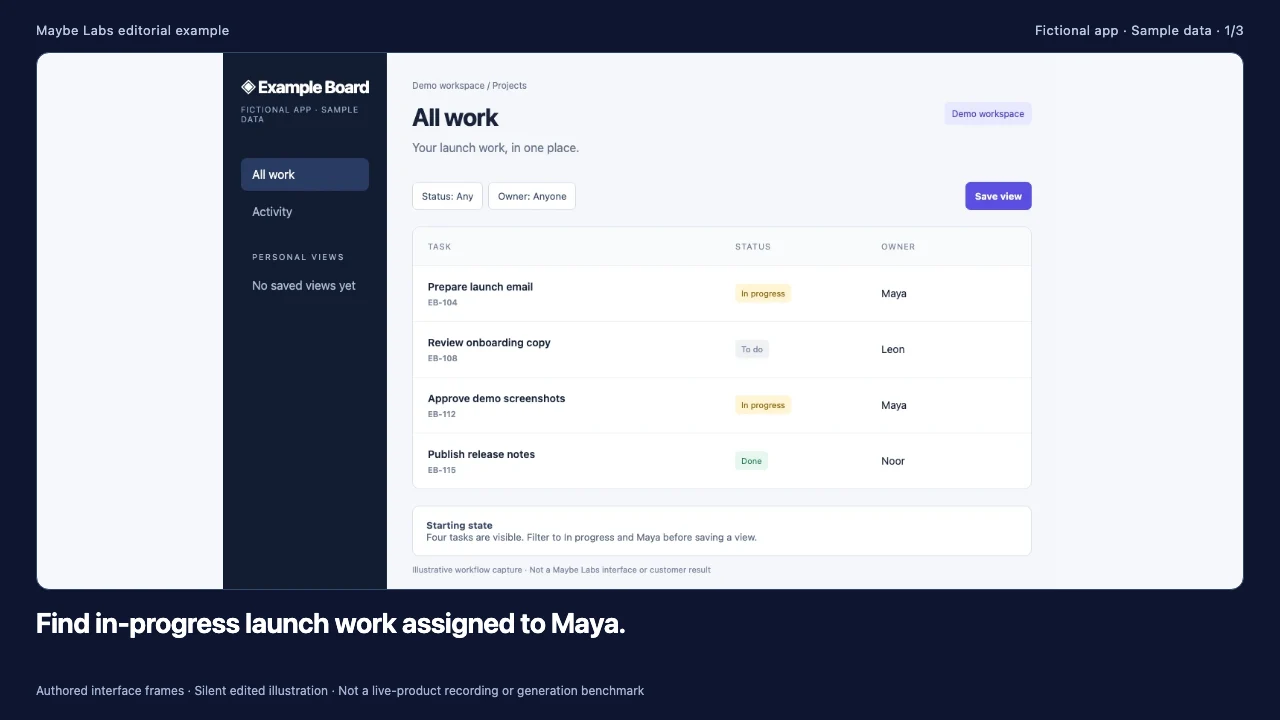
The viewer wants to return to in-progress launch work assigned to Maya. The starting list has four tasks. Two match the intended filter: EB-104 and EB-112. The demo’s job is to show how the filter configuration becomes a personal view and how the same configuration can be reopened.
Read descriptive transcript: Save a personal view: product demo example
- 00–08s A project lead begins in All work. Identify the two relevant tasks, EB-104 and EB-112, among four sample records.
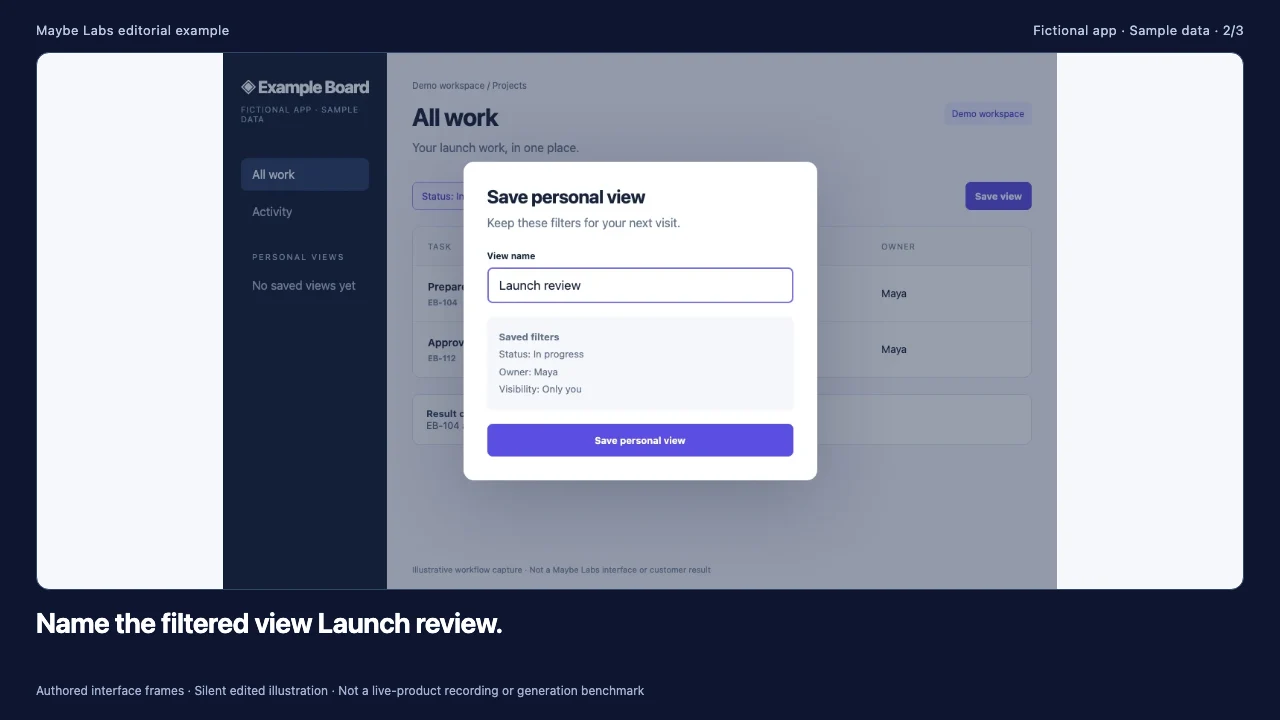
- 08–16s Save Status In progress and Owner Maya together. The dialog identifies this as a personal view visible only to its creator.
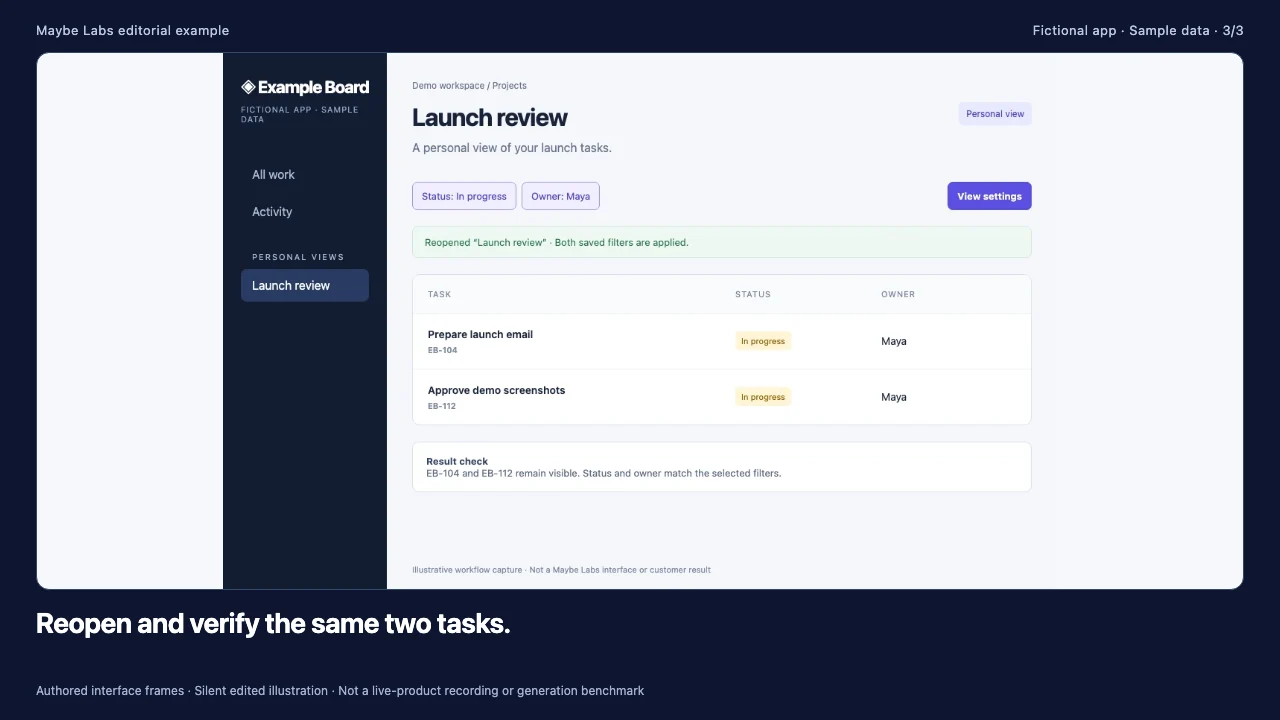
- 16–24s Select Launch review under Personal views. Confirm the task IDs and filter labels agree with the starting state.
Source frames: starting state, action or decision, and resulting state. Open the original frames to inspect the labels and sample records.
| Stage | Evidence in the source screen | What the viewer should understand |
|---|---|---|
| Start | All work with four task IDs | The task starts from a broader list. |
| Decision | Save personal view, Launch review, two filters, Only you | The view stores this configuration for its creator. |
| Result | Launch review selected, same two matching IDs | Reopening preserves the intended selection. |
Keep the narration or captions tied to the visible control labels. “Save personal view” is more useful than a vague promise to organize everything. If a tutorial must teach the exact click order, add the missing filter-menu state or a continuous recording. The three-frame cut establishes the task and result; it does not show every intermediate click. The AI product demo maker page includes a longer script you can adapt.
Example 2: a developer requests and retrieves a report
The developer needs the request shape, asynchronous state, and final response. The fictional API accepts a project and status filter, returns a report ID with a queued state, and later exposes a ready result under the same ID. The clip makes the distinction between accepting work and completing it explicit.
Read descriptive transcript: Request and retrieve a report: API demo example
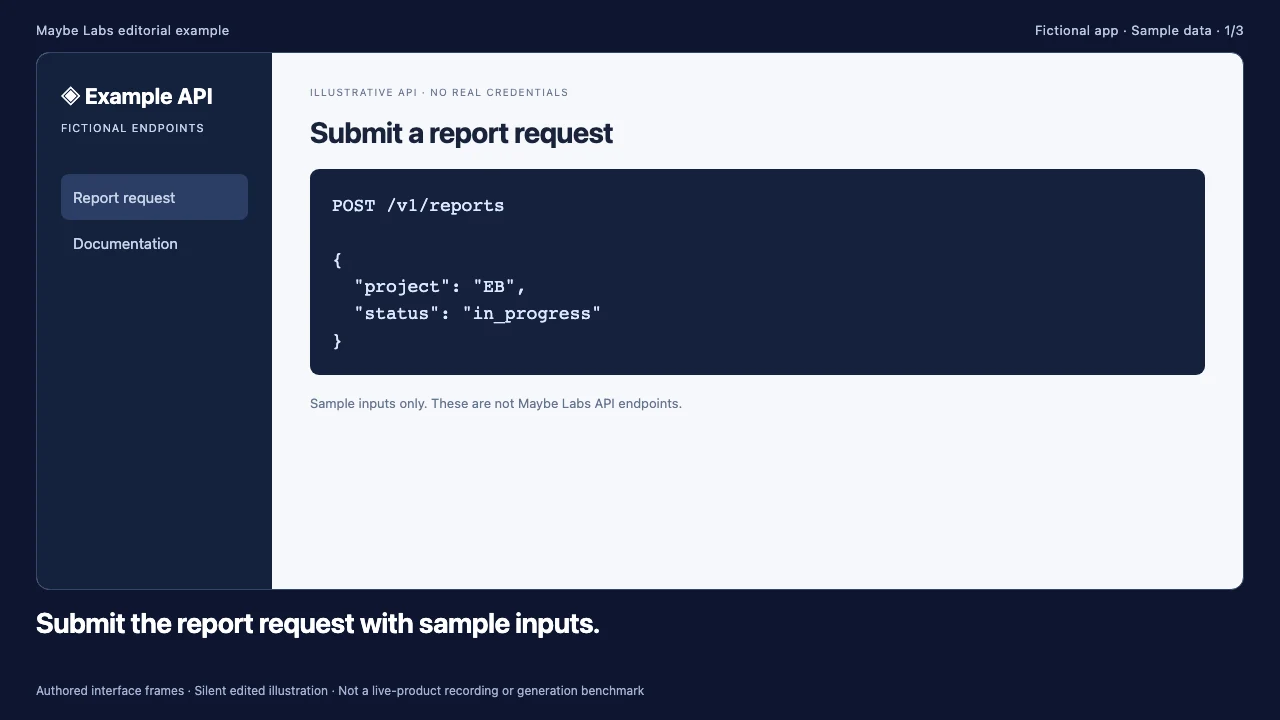
- 00–08s POST /v1/reports includes project EB and status in_progress. The request uses fictional identifiers and no real credentials.
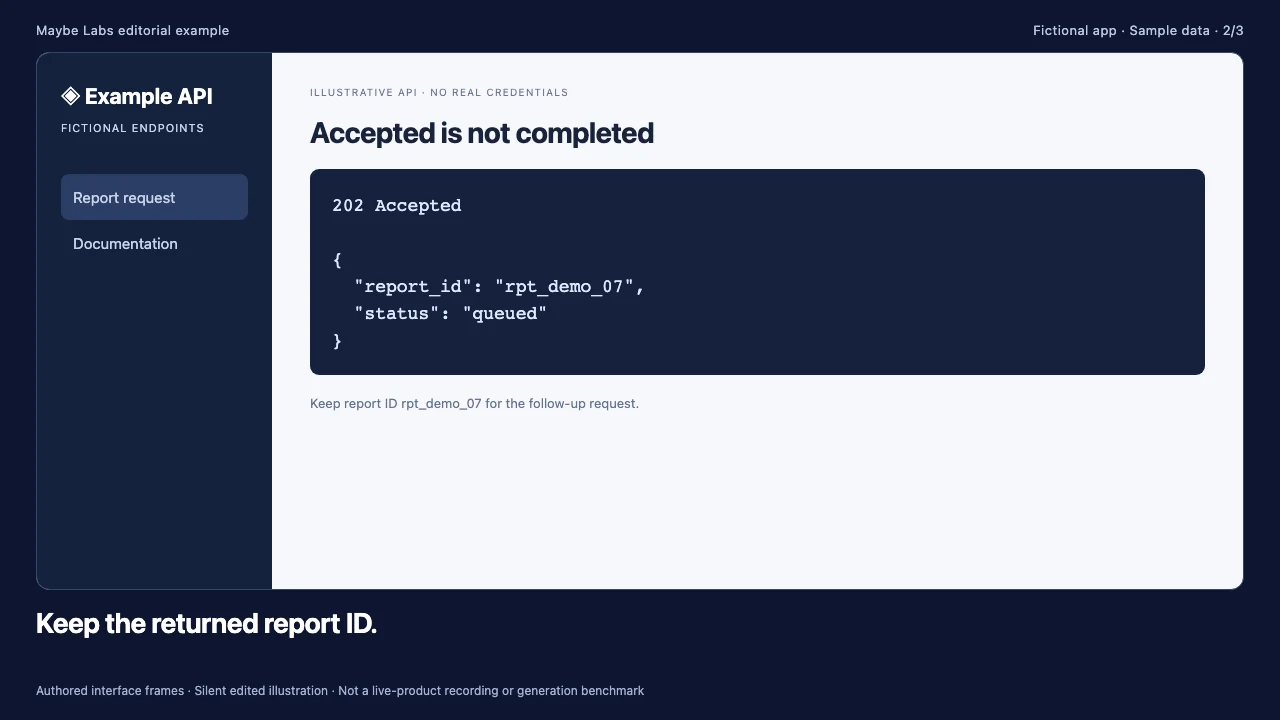
- 08–16s The illustrative response is 202 Accepted with report_id rpt_demo_07 and status queued. Accepted does not mean the report is complete.
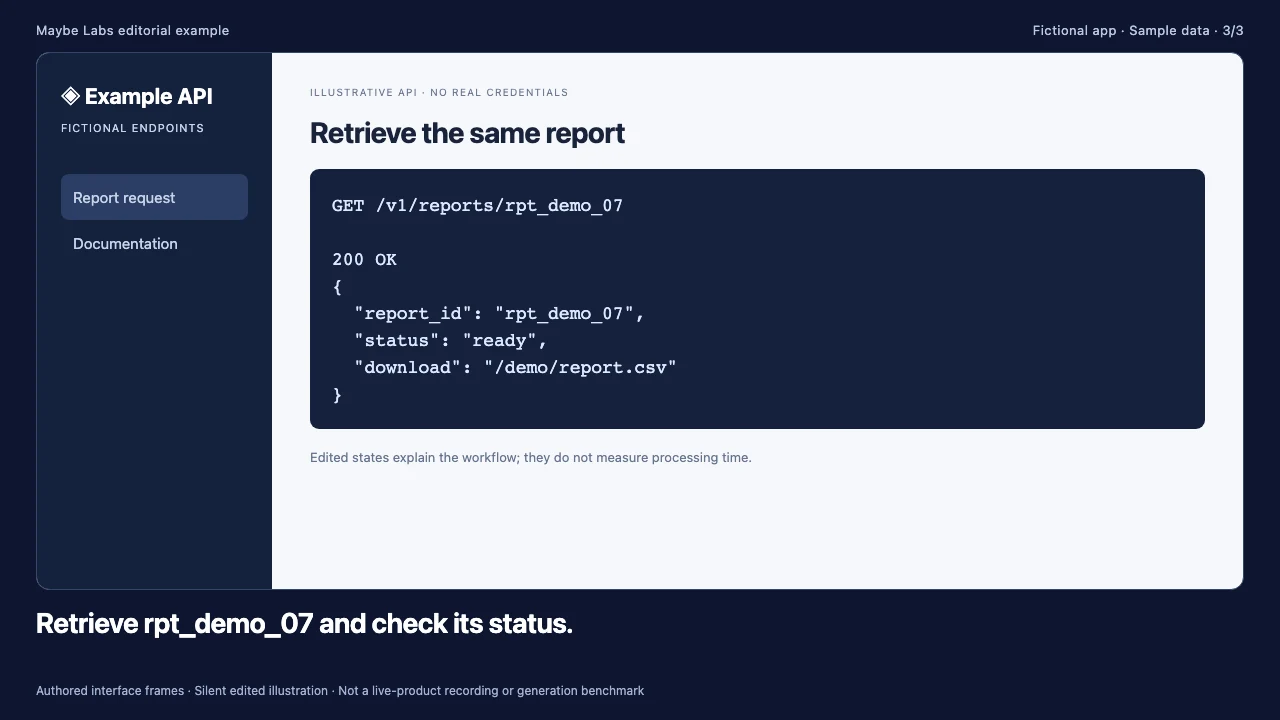
- 16–24s GET /v1/reports/rpt_demo_07 returns a ready status and a sample CSV path. This edited sequence does not measure processing time.
Source frames: starting state, action or decision, and resulting state. Open the original frames to inspect the labels and sample records.
| Screen | Important detail | Review question |
|---|---|---|
| POST request | /v1/reports with project EB and status in_progress | Are the example inputs consistent with the expected output? |
| Accepted response | 202, rpt_demo_07, queued | Does the explanation avoid treating accepted as completed? |
| Retrieve result | GET uses rpt_demo_07; status ready | Is the same identifier preserved across the workflow? |
The paths and response shapes here are fictional teaching material, not Maybe Labs API documentation. Do not send requests to them. In a real technical demo, link a maintained runnable example, redact credentials, and identify the API version. If a failure mode or permission changes the useful outcome, show it in the explanation or provide a separate example. Our API demo video guide explains how to plan that evidence.
This cut intentionally omits elapsed processing time. An edit between queued and ready cannot substantiate a latency claim. To make such a claim, use a suitable measurement method and disclose the environment and conditions. A confident-looking animation does not replace that work.
Example 3: an administrator reviews a request
The administrator’s task is a decision, not merely finding the Download button. The fixture starts with export request EX-17. Before approval, it shows the requested fields, destination, and scope. The ending state must refer to that same request so the viewer can connect the decision to its consequence.
Read descriptive transcript: Review an export request: administrator demo example
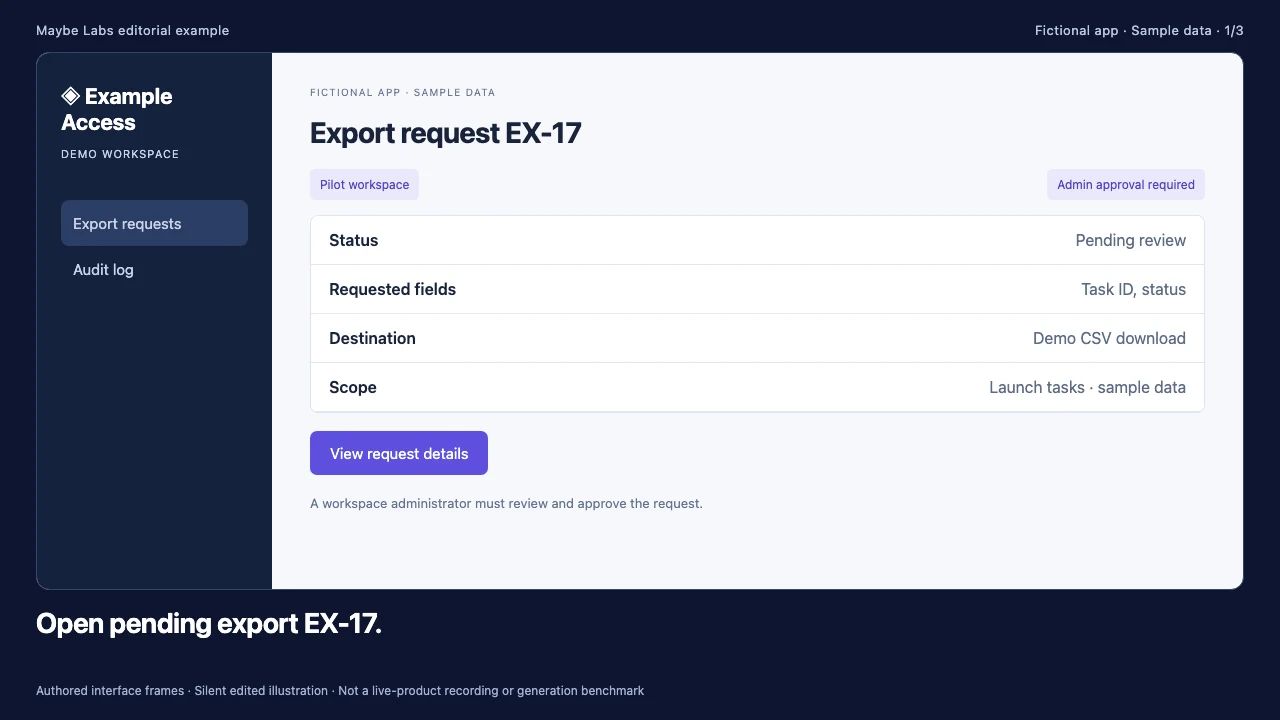
- 00–08s The administrator sees one request from a demo workspace. The task is to decide whether this export should be approved.
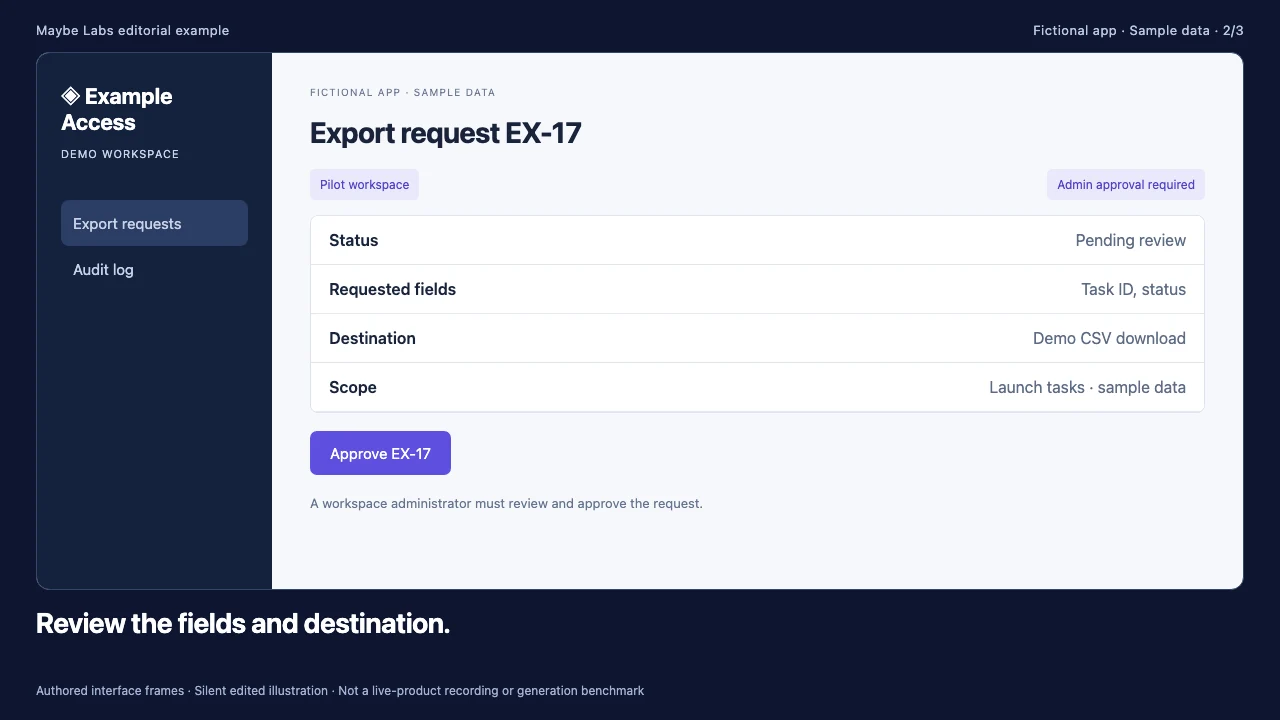
- 08–16s The request lists task ID and status, a demo CSV destination, and the requested scope. Review this information before making the approval decision.
- 16–24s The status changes to approved for the same request. The example ends at the resulting state and does not imply automatic approval.
Source frames: starting state, action or decision, and resulting state. Open the original frames to inspect the labels and sample records.
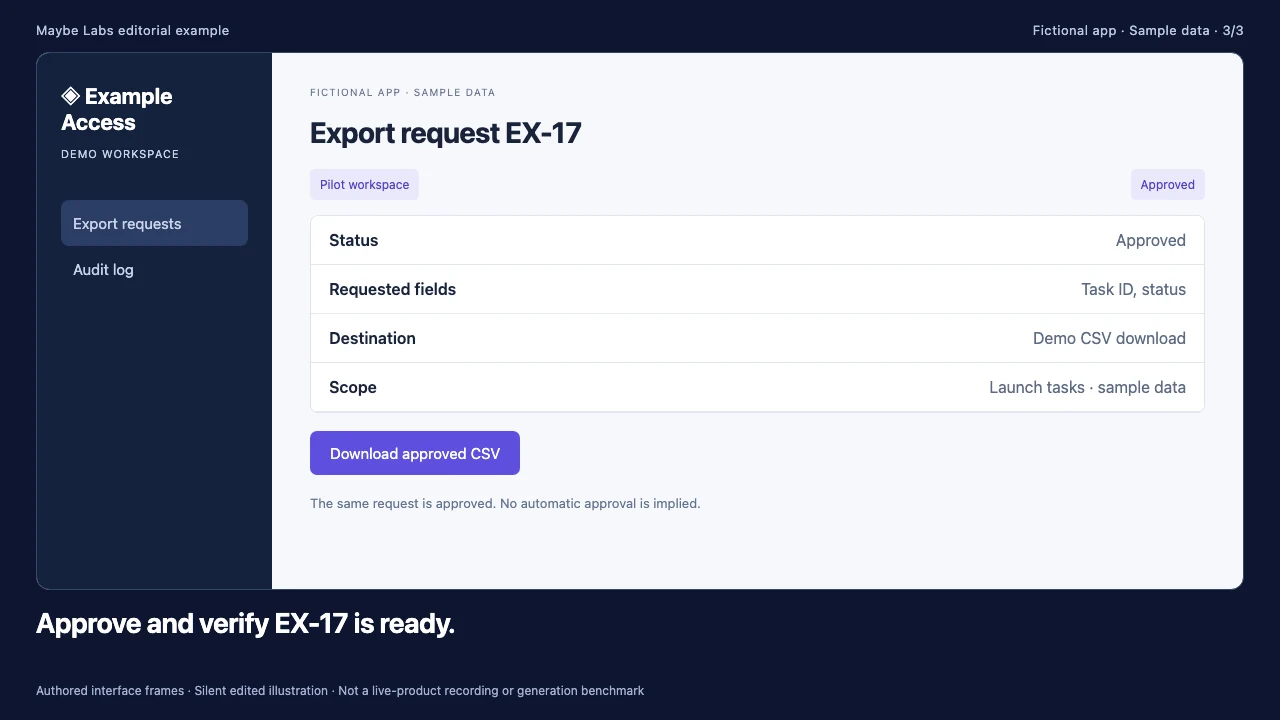
| Stage | Script emphasis | Evidence to keep readable |
|---|---|---|
| Pending request | Open EX-17 for review. | The request ID and pending status. |
| Review | Check fields, destination, and requested scope. | Task ID and status fields; demo CSV destination. |
| Approved result | Verify that EX-17 is ready. | The same ID with approved status. |
The product-update version of this workflow focuses on availability and what shipped. This administrator version focuses on who decides and what information they review. That audience difference changes the script even when some source screens overlap. Compare it with the product update examples. Do not imply that a manual approval can be skipped merely to shorten the cut.
Choose the audience before choosing the length
All three examples are 24-second, three-beat illustrations. A prospect may need only that compact explanation of the mechanism, while a new operator may need a longer tutorial with error states. A technical buyer may need code, documented limits, and a runnable reference. Set the scope around the decision the viewer must make, then allow enough time to read the essential evidence.
- Project lead: can I complete the recurring task and recognize its result?
- Developer: what input is required, which states exist, and what constitutes success?
- Administrator: who is authorized, what must be reviewed, and what changes after approval?
Prepare source captures that agree with the script
Use one consistent product version and demo account. Preserve record IDs, filter values, role names, and output labels across shots. Remove real private data before capture rather than relying on a later crop. Keep the source screenshots and script together so a reviewer can compare each statement with its evidence. The product demo screenshot checklist covers the preparation step.
For every clip, review at the intended publishing size with sound off. Check whether the input, action, and result remain understandable. Captions should explain the task without covering the control that matters. Provide a descriptive transcript when essential visual information would otherwise be lost. Our demo script guide helps order those decisions.
Know when the viewer needs more control
A linear demo can show a clear path, but it cannot let the viewer try alternative input. If exploring a branch is essential, use an interactive demo or live session alongside the video. If the task requires an exact unbroken sequence, record it. If the goal is an announcement, write a focused update rather than compressing a whole tutorial into a social cut.
Maybe Labs is designed for short motion-graphics videos with software evidence, reviewed story and visuals, and a timed animatic. It is in private beta with gradual waitlist access, free during beta and no credit card required. It is not an interactive sandbox. Treat the examples here as editorial structures to adapt to your own approved assets, not as customer results or promises of automatic output quality.
What makes a SaaS demo useful?
A defined audience, a recognizable task, evidence of the meaningful action, and a result that follows from the same inputs. Polish helps only when the underlying explanation is sound.
Should I show every click?
Show every essential action for the task. A short overview may omit routine transitions; a procedural tutorial usually needs more complete interaction evidence.
Can screenshots prove speed?
No. An edited screenshot sequence can explain states but does not establish loading or processing speed.
Make your next launch in motion
Bring a brief, brand assets, and product captures. Review the story, visuals, and exported video before publishing. Request free private-beta access.
Get early access →