Product Update Video Examples: Three Releases, With Scripts
 By the Maybe Labs team
A useful product update video explains one change, shows evidence of it, and tells eligible users where to act. The three examples below cover saved personal views, a dashboard filter, and an approval-gated export. Each has an original playable clip, the source facts, and a short script you can adapt.
Production note: we authored these fictional interfaces and assembled the clips locally from static interface frames and captions. They are finished editorial illustrations, not customer case studies, actual software interaction recordings, or demonstrations of Maybe Labs generation quality. All data and identifiers are samples. The cuts intentionally have no audio, and each includes captions and a descriptive transcript.
Example 1: announce saved personal views
Audience: existing project leads who return to the same filters. The fictional release note says: save a combination of status and owner filters, name it, and reopen it from Personal views. Visibility is personal only. The announcement should preserve that restriction rather than turning it into a team-sharing launch.
Read descriptive transcript: Saved personal views: product update example
- 00–08s All work starts with four sample tasks. The update is the ability to save personal filters, not a new project management product.
- 08–16s The save dialog preserves the filter combination and says visibility is Only you. Shared team views are outside this release.
- 16–24s The resulting view contains EB-104 and EB-112 with both filters applied. The next step is to save a personal view in All work.
Source frames: starting state, action or decision, and resulting state. Open the original frames to inspect the labels and sample records.
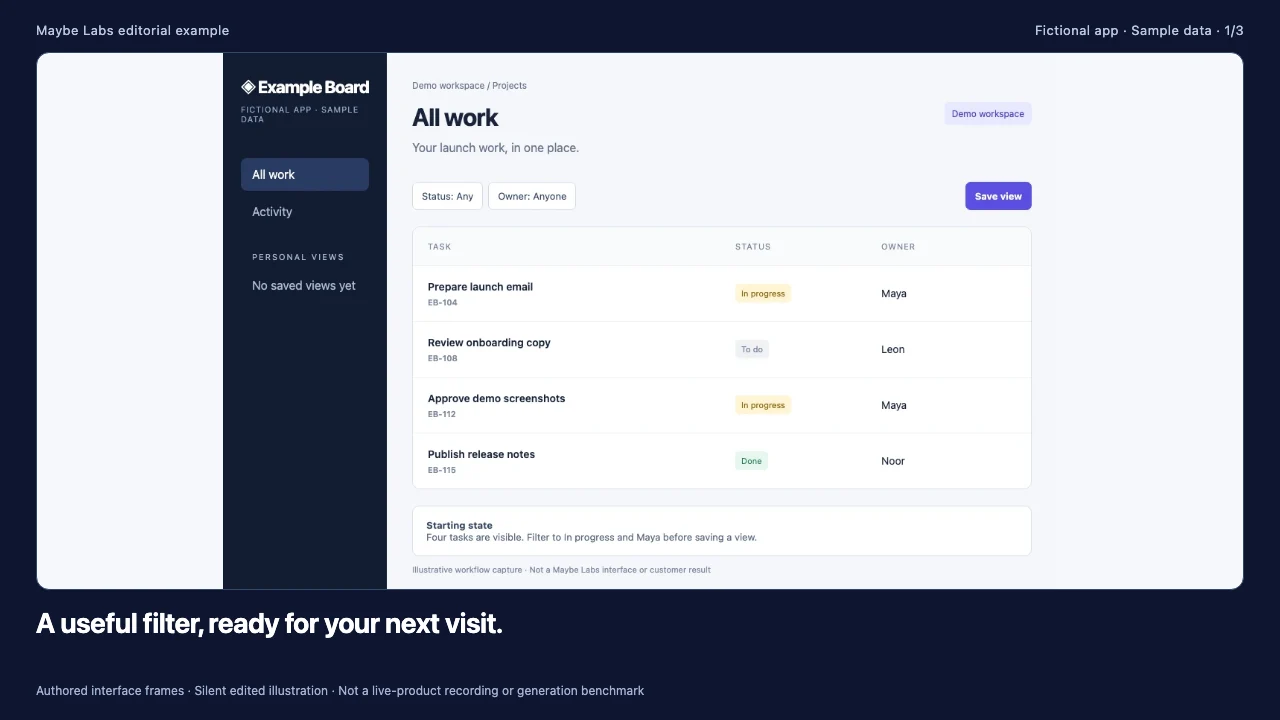
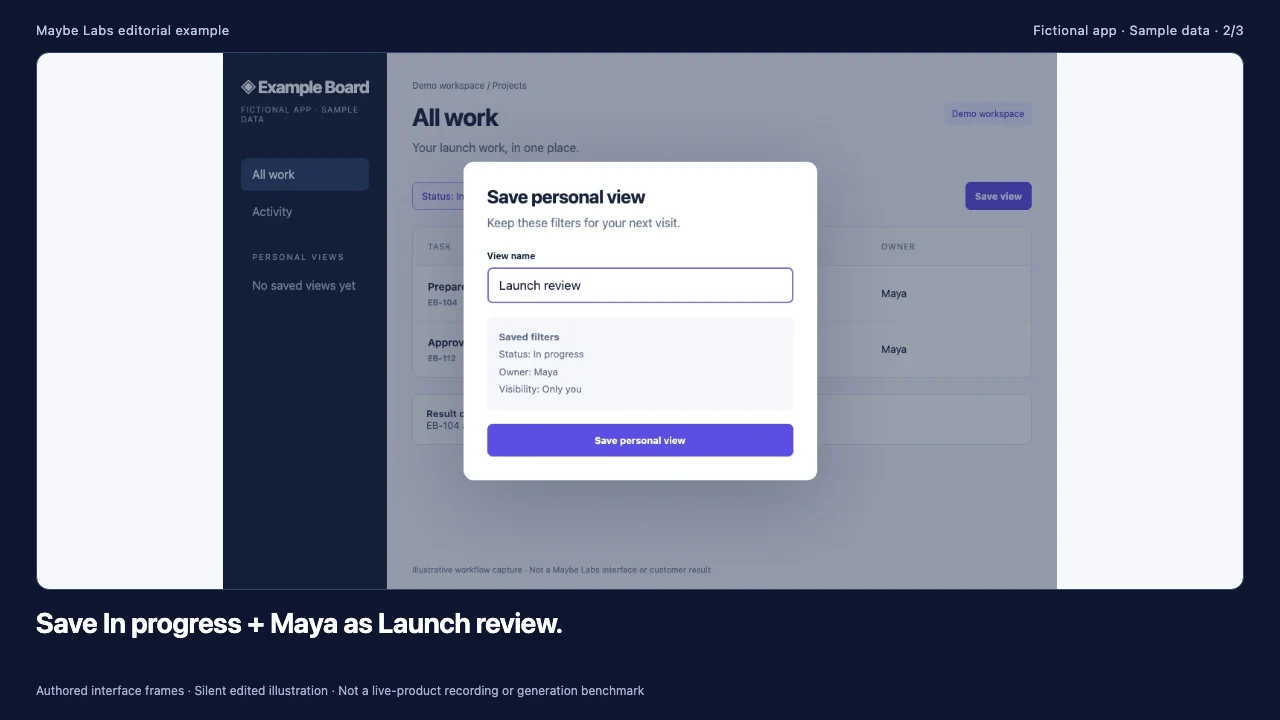
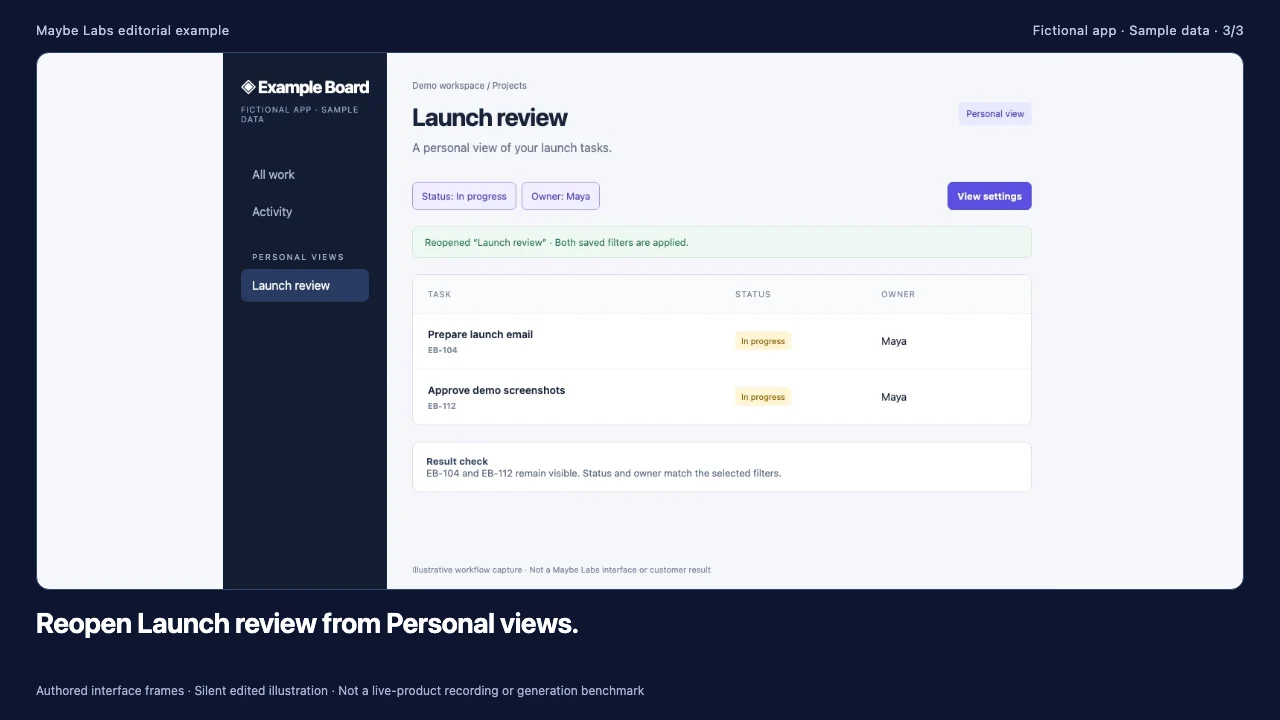
| Source capture | On-screen message | Check before publication |
|---|---|---|
| All work | Your launch filters, saved for next time. | Four sample tasks establish the starting state. |
| Save personal view | Save In progress + Maya as Launch review. | The dialog shows Only you and both filter values. |
| Reopened view | Open Launch review from Personal views. | EB-104 and EB-112 remain the matching records. |
Why this structure is useful: the audience already understands the project app. It needs the new capability and entry point, not a second introduction to project management. The closing instruction can link to the complete release note. Do not add an unmeasured claim about hours saved. The product update maker example expands this into a planning brief and review checklist.
Example 2: announce a region filter without inventing growth
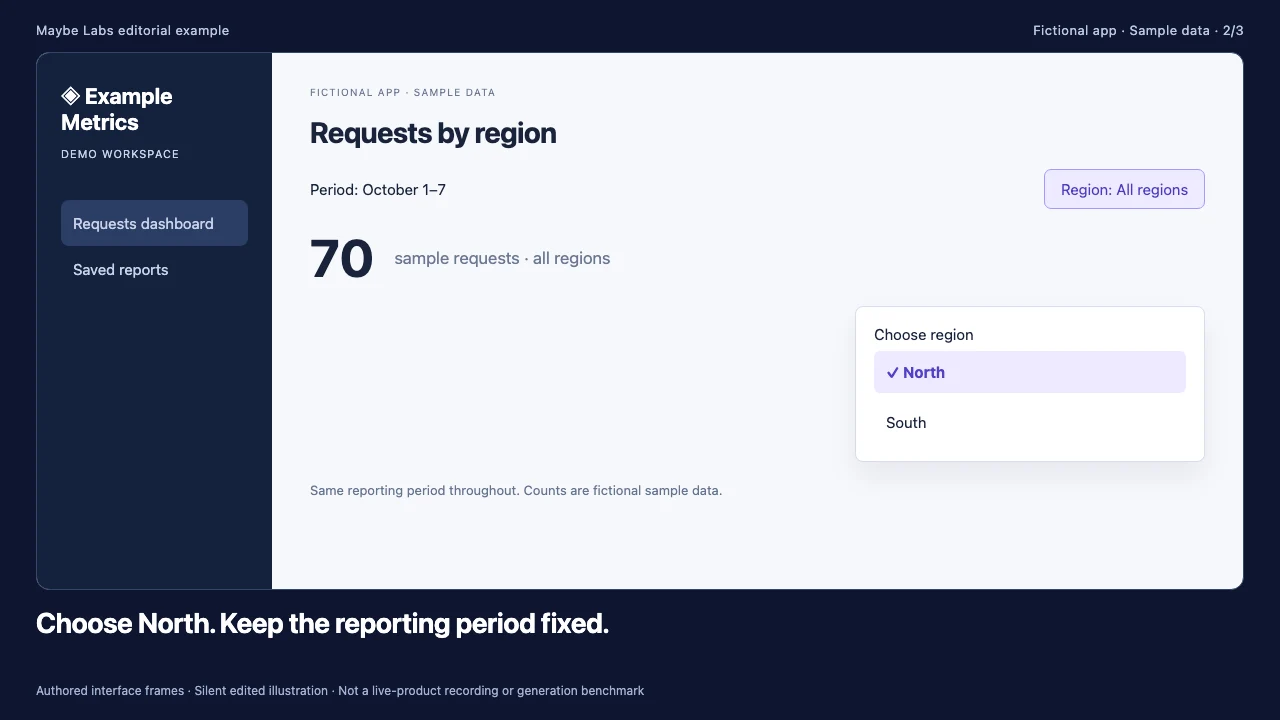
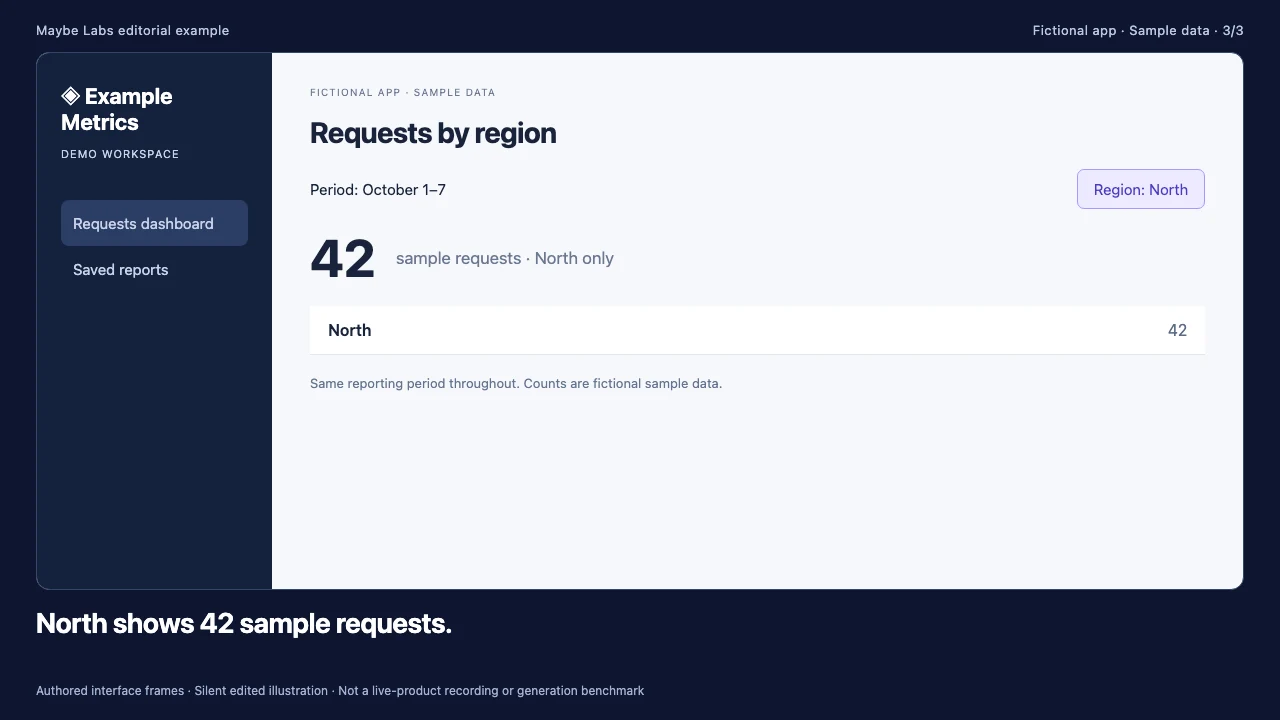
Audience: operations managers reviewing a regional dashboard. The source note says: the dashboard now filters requests by region while keeping the selected reporting period. The fixture starts with 42 North requests and 28 South requests, for a total of 70 sample requests. Selecting North should show 42, with October 1–7 unchanged.
Read descriptive transcript: Region filter: product update example
- 00–08s The fictional dashboard starts with North 42 and South 28, totaling 70 sample requests in the same reporting period.
- 08–16s North is highlighted in the open region menu. The current total still includes all regions until the selection is applied; October 1–7 remains fixed.
- 16–24s The resulting dashboard shows North only and a total of 42. This illustrates a filter result, not business growth or a customer benchmark.
Source frames: starting state, action or decision, and resulting state. Open the original frames to inspect the labels and sample records.
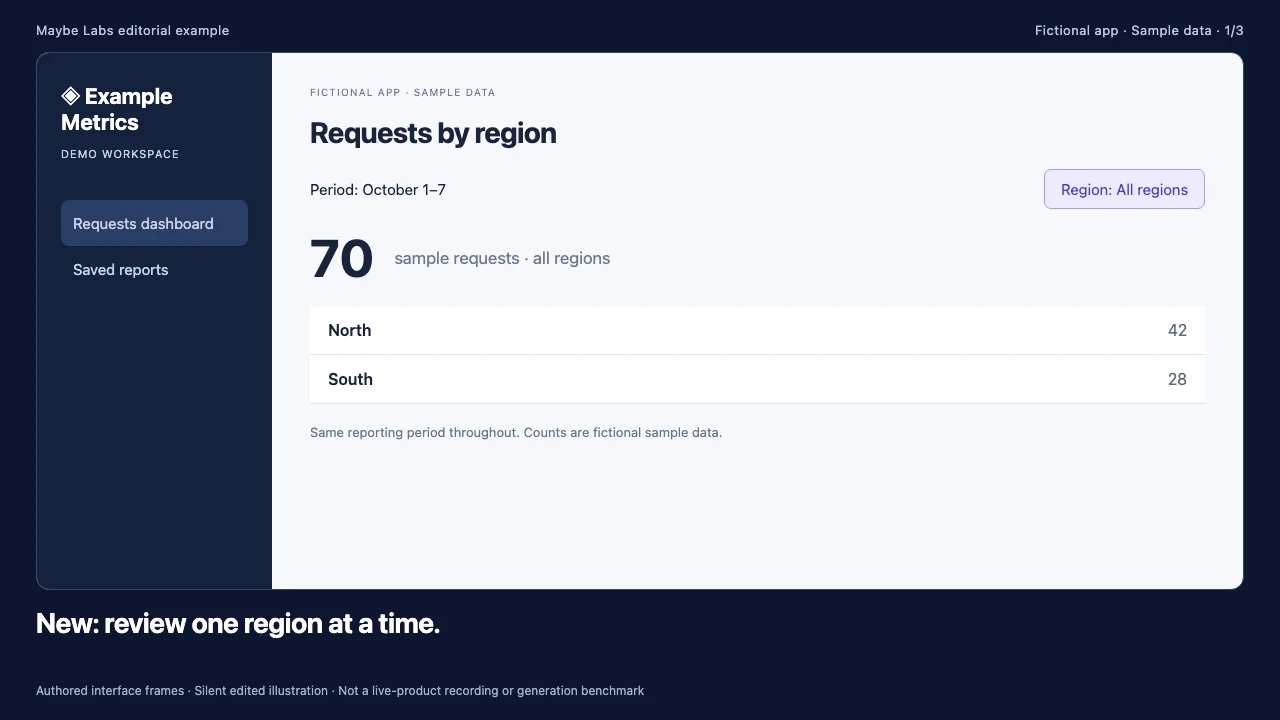
| Beat | Script | Evidence |
|---|---|---|
| Set context | New: review one region at a time. | All-region total 70 and the fixed reporting period. |
| Show action | Choose North in the region selector. | The selected control is visible in the second frame. |
| Confirm result | North shows 42 sample requests. | The region label, total, and period agree. |
What to avoid: a before-and-after chart can look like growth even when the only change is a filter. Name the transformation precisely. These numbers explain the sample dataset and are not a business-performance claim. If your actual feature changes the calculation as well as the filter, document that difference in the written notes and supply evidence for it.
Example 3: announce an export with a limited rollout
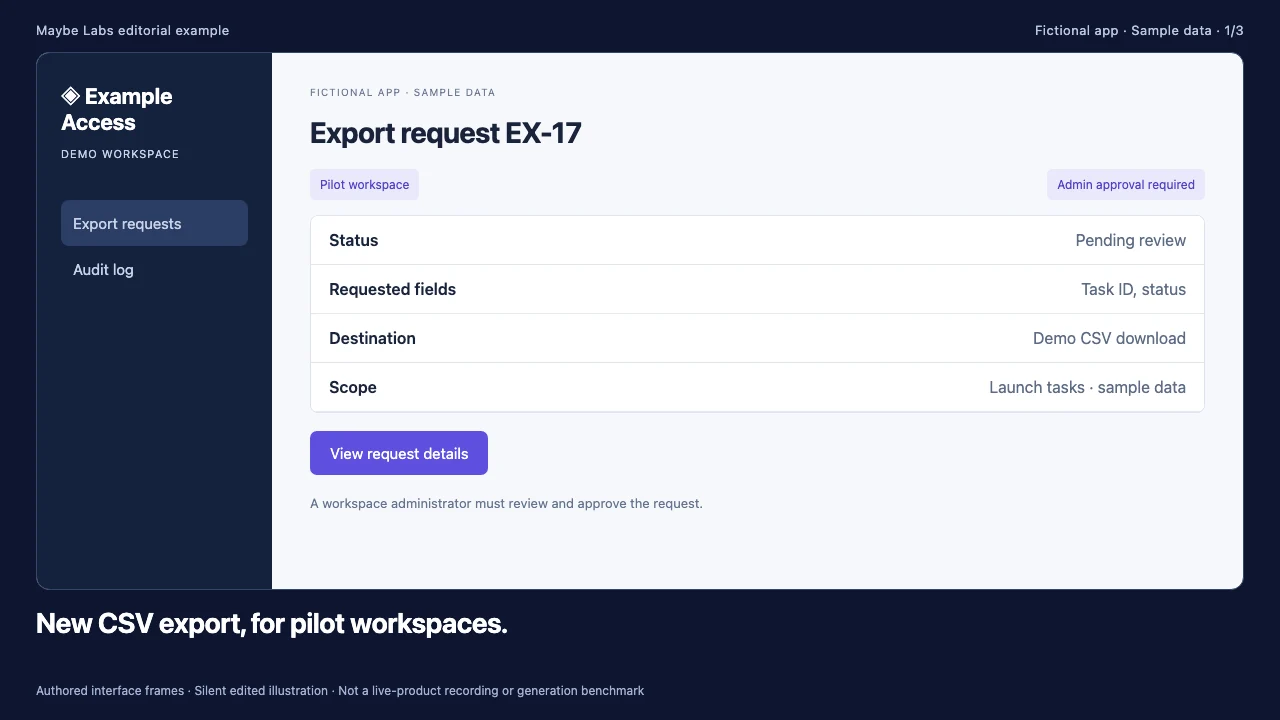
Audience: people in a fictional pilot workspace. The source note says: CSV export is available to pilot workspaces, requests require an administrator’s approval, and a download becomes available after approval. The clip should not imply that everyone can export immediately or that approval happens automatically.
Read descriptive transcript: Approval-gated export: product update example
- 00–08s The export panel identifies the limited pilot rollout. Workspace membership alone does not grant permission to approve exports.
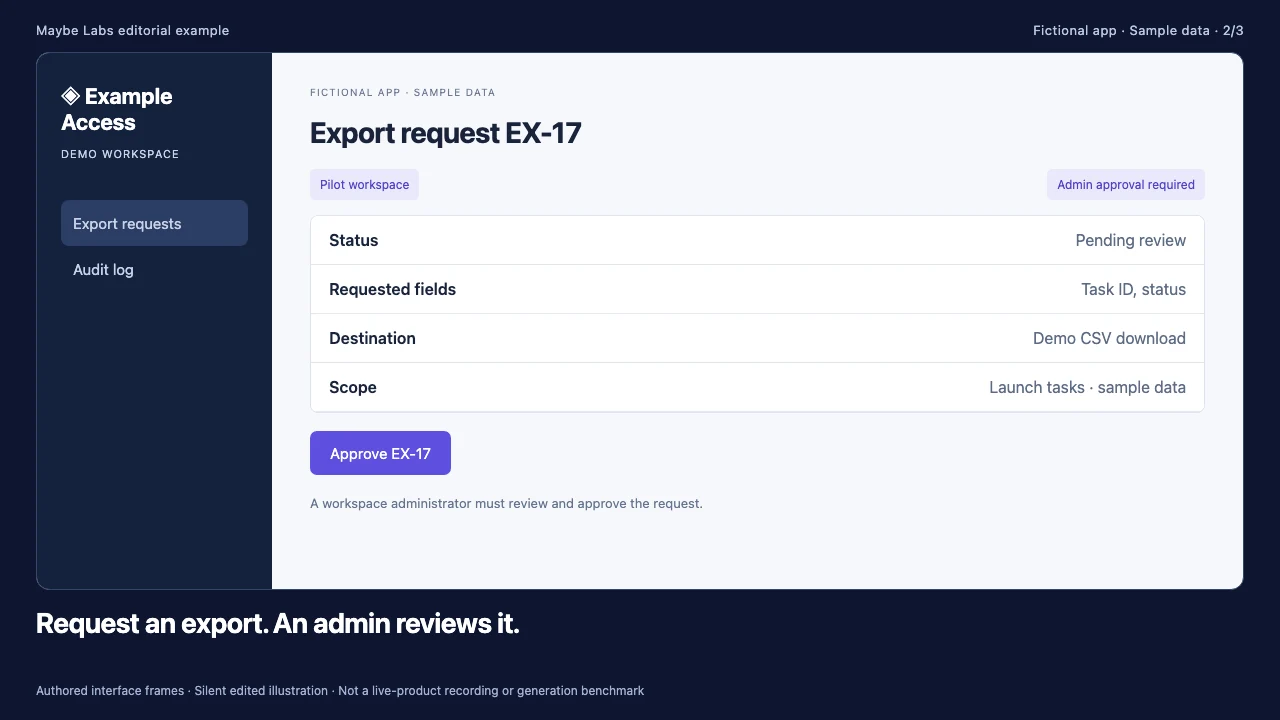
- 08–16s Request EX-17 is pending. The administrator sees the requested fields and destination before choosing whether to approve.
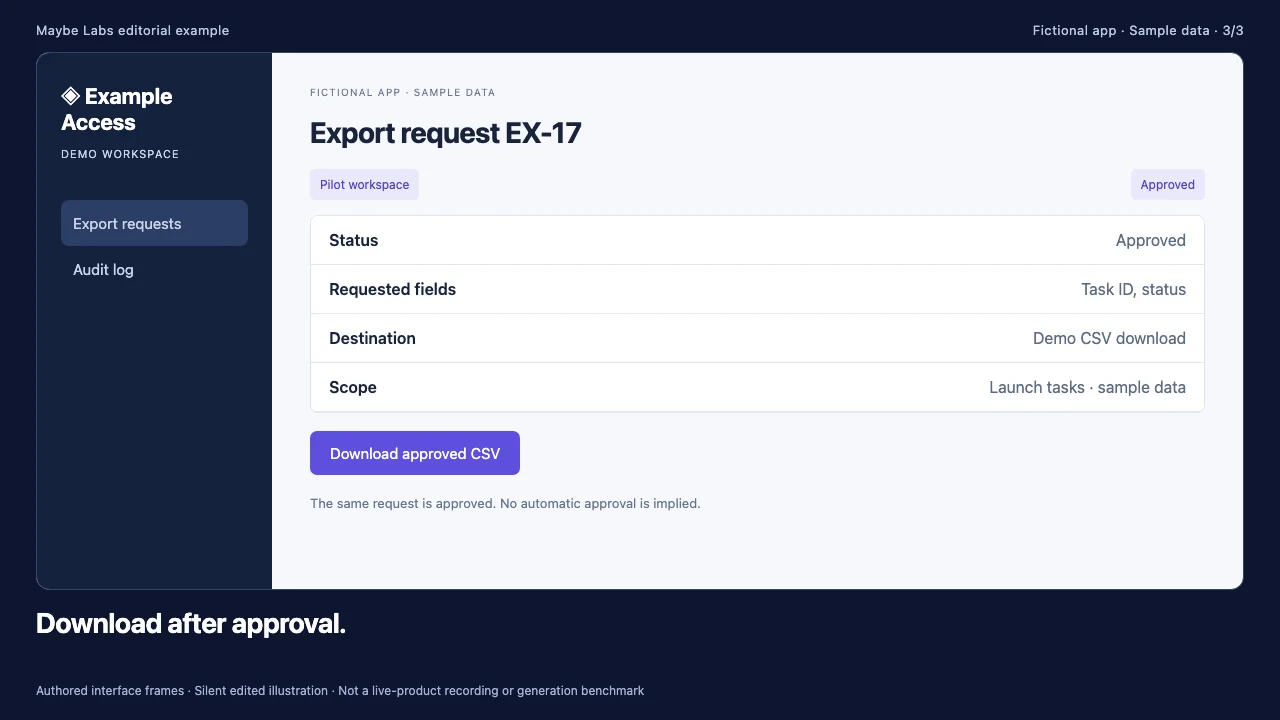
- 16–24s EX-17 is approved and a sample download is available. The update preserves both the pilot restriction and the human approval step.
Source frames: starting state, action or decision, and resulting state. Open the original frames to inspect the labels and sample records.
| Beat | Script | Restriction to preserve |
|---|---|---|
| Availability | New CSV export for pilot workspaces. | Pilot access is narrower than general availability. |
| Workflow | Request an export. An admin reviews it. | A human decision remains part of the task. |
| Result | Download after approval. | The same EX-17 request changes state. |
The final destination should answer who is eligible, which role approves, what fields are exported, and how someone outside the pilot requests access. A short clip can name the boundary and link to the full explanation; it should not hide the boundary in an unreadable end card. For a deeper operational explanation, compare the administrator version in our product demo video examples.
A repeatable template for your next release
- Source: write the exact change, eligibility, limitations, and useful next step.
- Evidence: collect the starting state, meaningful action or decision, and resulting state from the same product version.
- Script: write one message for each visible change; use language the audience already recognizes.
- Review: check labels, record continuity, permissions, and small-screen reading time.
- Distribution: pair the video with a complete written update and an accurate destination.
- Measurement: distinguish a recorded exposure from completed feature use.
The runtime of these examples is 24 seconds because each contains three eight-second beats. That is an editorial choice for these assets, not a rule for every release. Our release notes to video guide covers the planning process, and the announcement guide covers channel selection. Use a longer explanation or a separate help article when a task needs more detail.
Choose a production workflow that fits the evidence
If the update depends on a continuous interaction, record that interaction. If the value is a clear change between verified states, a designed screenshot-led cut may be suitable. If users need to choose a branch, consider an interactive demo rather than a linear video. The tool comparison separates these starting points and documents its sources.
Maybe Labs supports planning short designed product-update videos from a brief, approved brand assets, and product captures. Review the story, required visuals, and timed animatic before rendering. Access is currently through a gradual private-beta waitlist, free during beta with no credit card required. These example clips are editorial teaching assets and are not evidence of automated generation speed.
Measure the behavior the announcement is supposed to change
For the saved-view release, a meaningful outcome is a successful save followed by a later reopen. For the regional dashboard, it may be a completed filtered review. For the export, it may be a correctly approved request. Define eligibility and a complete observation window before comparing cohorts. The feature adoption metrics guide provides a worked event plan and calculations.
Are these real customer results?
No. They are original editorial clips using authored fictional interfaces and sample data. There are no customer conversion or performance claims.
Can I copy the structure for my release?
Yes. Adapt the source-note, evidence, script, and review structure to your actual product. Replace the fictional screenshots and conditions with approved captures and verified facts.
Does every fix need a video?
No. Choose a change whose behavior or value benefits from visual explanation. Keep minor fixes in the written release notes when that is the clearer communication.
Make your next launch in motion
Bring a brief, brand assets, and product captures. Review the story, visuals, and exported video before publishing. Request free private-beta access.
Get early access →